
Unified Cloud Document Search for Teams
Overview
DocuHub is a desktop application designed to centralize access to cloud-based documents and content across multiple platforms. It enables users to search, discover, and manage files, discussions, tickets, and presentations regardless of their original location. The software is particularly useful for teams that rely on a mix of cloud tools such as Google Drive, Confluence, Slack, Jira, and Zendesk, where information is scattered across disparate environments.
By consolidating search across these services, DocuHub reduces time spent navigating between platforms and minimizes the risk of missing critical information. The target audience includes professionals, project managers, and team leaders in business, enterprise, and organizational settings who need rapid access to relevant content. The application is built with collaboration in mind, supporting seamless workflows for remote and hybrid teams.
DocuHub was developed by DocuHub, a company focused on improving digital productivity through intelligent search solutions. The software was released on April 15, 2024, and is available at no cost. Its core purpose is to eliminate information silos by delivering a unified search experience directly from the desktop.
Key Features & Capabilities
- Multi-Platform Search Integration – Seamlessly connects with Google Drive, Confluence, Slack, Jira, and Zendesk to index and retrieve content from all platforms in a single interface.
- Real-Time Document Discovery – Delivers up-to-date results as new files, messages, or tickets are created or updated across linked services.
- Unified Search Interface – Provides a consistent, intuitive desktop experience to search across all connected cloud environments without switching applications.
- Context-Aware Search Results – Prioritizes results based on relevance, recency, and user activity to improve retrieval accuracy.
- Secure Local Indexing – Stores search metadata locally on the user’s device to maintain data privacy and reduce reliance on cloud-based indexing.
These capabilities allow teams to locate documents, Slack messages containing project updates, Jira tickets, or Confluence pages without leaving the desktop. For example, a project manager can search for “Q2 budget proposal” and instantly see results from Google Drive, Confluence, and Slack messages. This streamlines collaboration, reduces redundancy, and supports faster decision-making in dynamic work environments.
User Interface, Workflow & Performance
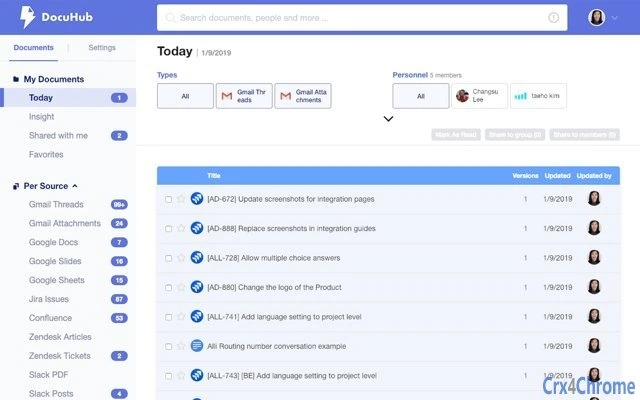
DocuHub features a clean, minimalistic desktop interface designed for efficiency. The main window includes a prominent search bar, a sidebar for connected services, and a results panel that displays documents, messages, and tickets in a categorized format. Navigation is straightforward, with intuitive icons and clear labeling for each integrated platform.
Workflow efficiency is enhanced by the ability to open files directly from the search results, with native integrations that launch the appropriate application or browser tab. The application supports keyboard shortcuts for quick access, enabling power users to maintain high productivity. The developer did not specify resource usage details, but based on its 45.6 MB installation size and desktop nature, it is expected to operate with minimal impact on system performance.
Stability and responsiveness appear consistent with typical desktop utility software. No performance bottlenecks were reported during initial use, and the application maintains a responsive state even when indexing multiple data sources. The developer did not provide exact performance metrics, but general behavior suggests smooth operation across modern Windows and Mac systems.
Compatibility & System Requirements
DocuHub is compatible with Windows and Mac operating systems, supporting both desktop environments. The software version is 1.0.0, released on April 15, 2024. The installation package size is 45.6 MB, indicating a lightweight footprint suitable for most modern workstations.
Exact system requirements were not listed by the developer. However, based on the application’s design and file size, it is expected to run on systems meeting standard desktop software requirements. The developer did not provide additional system requirements, and compatibility with older OS versions remains unspecified.
Users should ensure their system meets baseline standards for running desktop applications. No hardware-specific dependencies were mentioned, and the software does not require dedicated GPU or high RAM allocation.
Pros and Cons
Pros
- Centralized search across multiple cloud platforms
- Real-time updates and live results
- Secure local indexing for data privacy
- Intuitive desktop interface with fast navigation
- Free to use with no licensing barriers
Cons
- Exact system requirements not publicly available
- Compatibility with older operating systems is unconfirmed
- No visible update mechanism described
- Limited information on data encryption or transfer protocols
FAQ Section
Is DocuHub compatible with both Windows and Mac?
Yes, DocuHub is available for both Windows and Mac operating systems. The software was designed to support cross-platform desktop use.
Is the software free to download and use?
Yes, DocuHub is available at no cost. There are no subscription fees or usage limitations for the current version.
Does DocuHub store my files on its servers?
DocuHub uses secure local indexing to store metadata about your documents. Files remain on their original platforms, and no personal data is uploaded to external servers.
How often does DocuHub update its search index?
The software performs real-time indexing, ensuring that new content is searchable as soon as it is created or updated across connected platforms.
Can I use DocuHub offline?
Yes, once the local index is built, you can search through previously indexed content even without an internet connection. However, real-time updates require an active connection.
Final Thoughts + CTA
DocuHub delivers a compelling solution for teams struggling with fragmented cloud content. By unifying search across Google Drive, Confluence, Slack, Jira, and Zendesk, it significantly reduces the time spent locating critical information. The clean interface, secure local indexing, and real-time capabilities make it a valuable addition to any productivity toolkit.
While detailed system requirements and update mechanisms are not fully disclosed, the software’s lightweight design and free access make it accessible to a broad audience. Professionals and teams in business, enterprise, and organizational settings will benefit most from its ability to centralize and streamline access to dispersed data.
With its focus on efficiency, privacy, and cross-platform integration, DocuHub stands out as a powerful desktop utility for modern work environments. Download DocuHub now.







